Clínica Aurora MCP server
The clinic schedule published as a Model Context Protocol server, so any MCP client can book, reschedule and cancel through it. The business rules are enforced on the server, not requested in a prompt.
Who has this problem
An MCP integration needs to separate proposing a schedule change from committing it. The server binds each proposal to a single-use token, checks business policy again at commit and records the decision. Human approval must be collected and enforced by the MCP client or surrounding workflow.
My role
MCP server integrated with the clinic API and its deterministic policy engine.
How to try it
- A browser cannot open this endpoint: it speaks a protocol, not a page. A GET returns 406 on purpose.
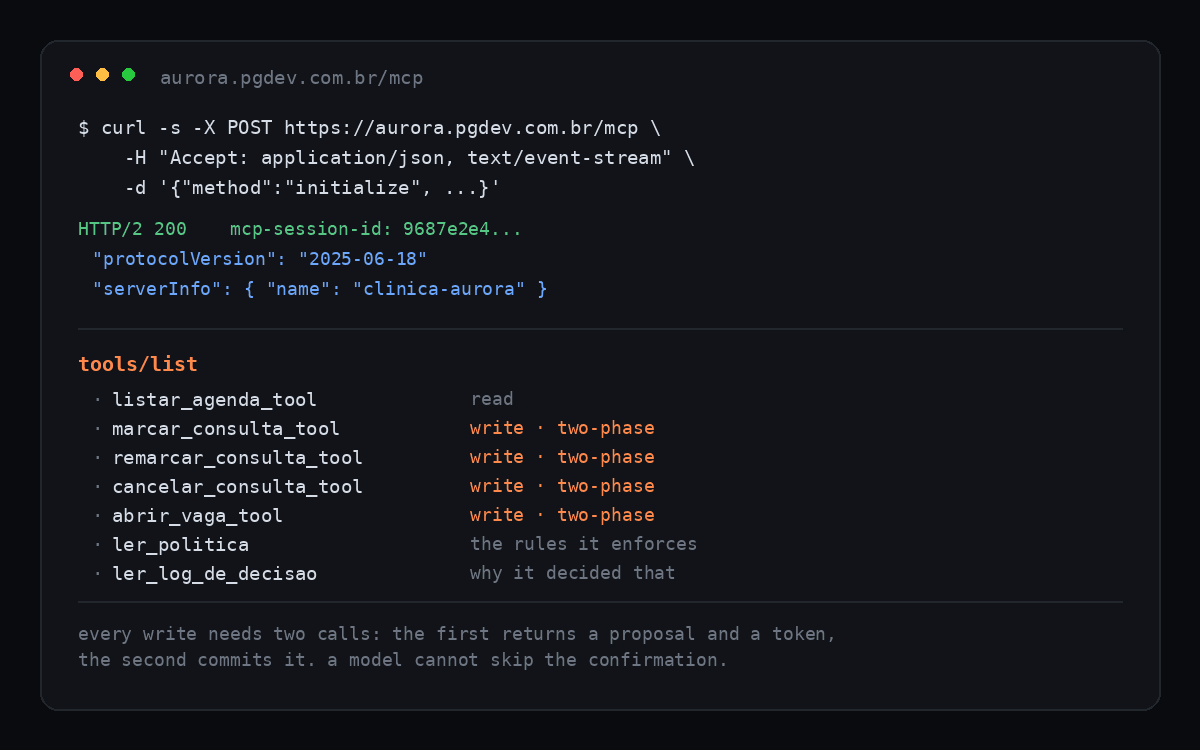
- POST to https://aurora.pgdev.com.br/mcp with
Content-Type: application/json,Accept: application/json, text/event-streamand aninitializecall. Complete initialization before callingtools/listwith the returned session id. - Or connect a compatible MCP client to that URL and inspect the available tools.
Decisions I made
- Every write takes two calls. The first returns a proposal and a single-use token without touching the schedule; the second submits that operation with the token and the server checks policy again. The token binds the operation; the MCP client is responsible for human approval.
- The business rules are a deterministic policy engine behind the tools, not instructions in the system prompt. A write the policy refuses comes back as a refusal with the rule code, and the model is told to read
ler_politicabefore promising anything to anyone. - Read tools expose the policy and rule-coded decision records so an MCP client can inspect why an operation was allowed or refused.
- It is the same clinic the chat demo uses, so the two can be compared side by side: one shows a person talking to an agent, the other shows another agent plugging into the same guarded schedule.
- Protocol version 2025-06-18, streamable HTTP with session ids, running behind Traefik as its own service.
Limits that remain
- It serves the demo schedule only, the same one the chat demo uses, and that schedule resets on its own.